Instagram Carousel Size Guide 2026: Dimensions, Ratios, and Specs
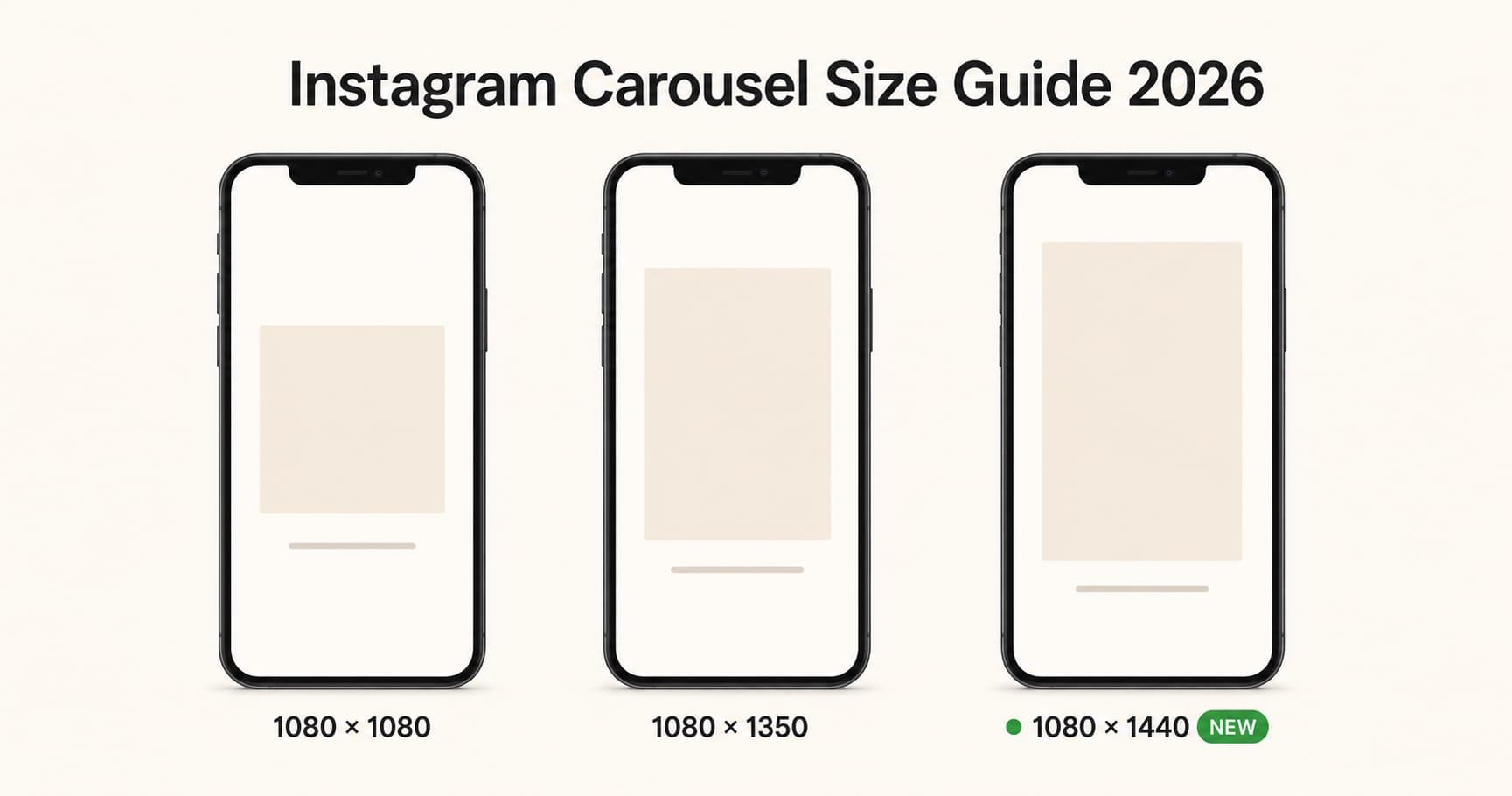
The fastest way to ruin a carousel is to upload slides that get cropped, blurred, or padded with white bars. Get the size right once and you stop fighting the platform.
This guide is the complete 2026 reference for Instagram carousel dimensions: the recommended pixel sizes, every supported aspect ratio, slide and file limits, the new 1080 by 1440 format, and the safe zones that decide whether your hook survives the feed and the profile grid.
What's New in 2026
Last updated: May 2026.
Two changes matter this year:
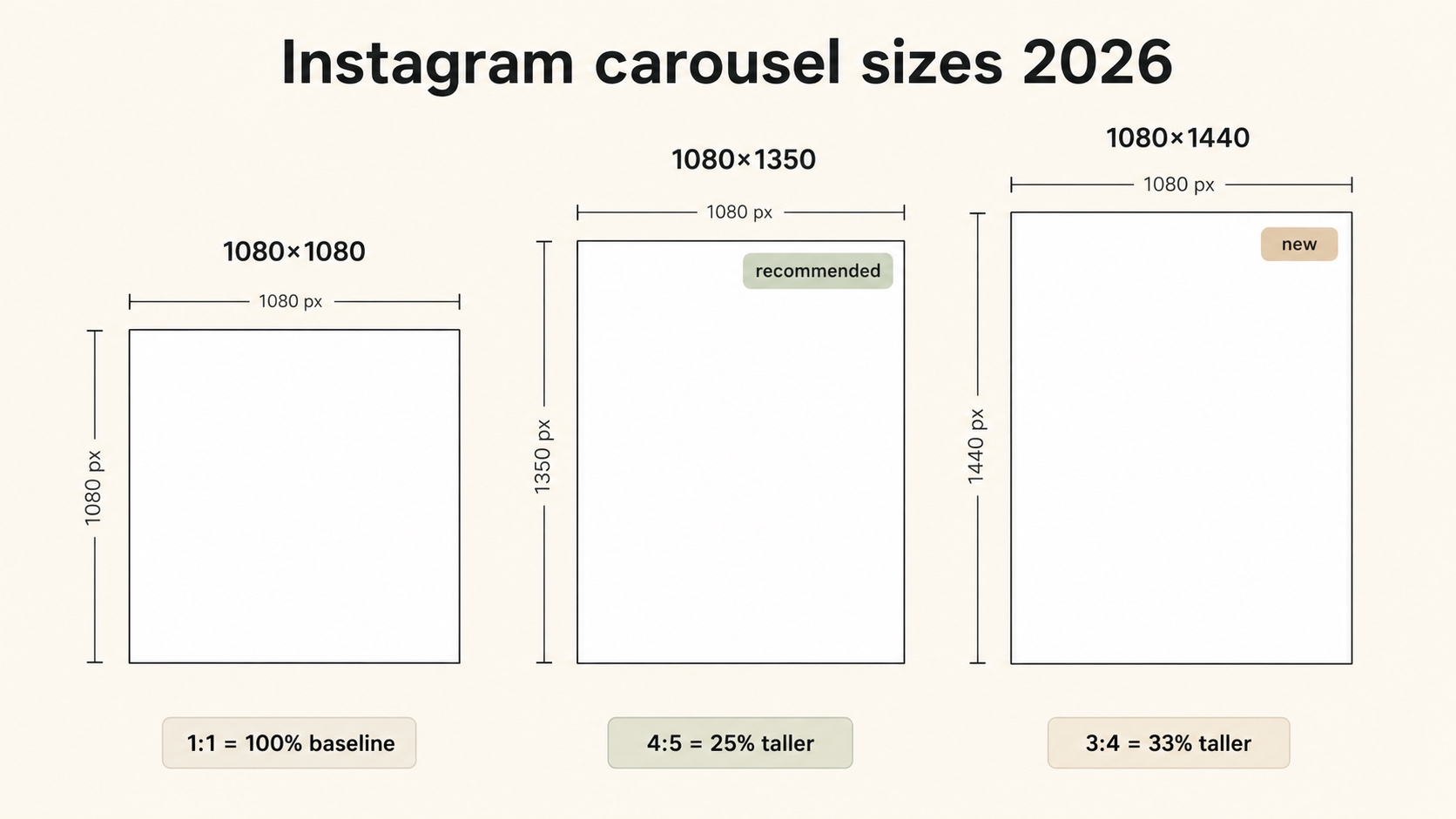
- New 3:4 carousel option (1080 by 1440 pixels). Instagram added a third vertical option in 2026, sitting between 4:5 (1080 by 1350) and 9:16 (1080 by 1920). It gives roughly 7 percent more vertical space than 4:5, and it matches the 3:4 ratio Instagram uses for the profile grid, so cover slides that were getting top-and-bottom cropped on the grid look cleaner now.
- The 4:5 preset is still the recommended default. Despite the new 3:4 option, Instagram still defaults to 4:5 (1080 by 1350) in the carousel uploader, and it remains the format with the longest engagement track record. Treat 3:4 as a tool for specific use cases, not the new universal standard.
The slide count cap (20), file size caps, and video length caps are unchanged from 2024.
Instagram Carousel Dimensions at a Glance
| Aspect ratio | Pixel size | Best for |
|---|---|---|
| 4:5 (portrait) | 1080 × 1350 px | Default. Highest engagement. Works everywhere. |
| 3:4 (tall, new) | 1080 × 1440 px | Long-form text, tutorials, fashion. Matches the profile grid ratio. |
| 1:1 (square) | 1080 × 1080 px | Cross-platform reuse, photo-heavy carousels, brand consistency. |
| 1.91:1 (landscape) | 1080 × 566 px | Rare. Only when source is genuinely landscape. |
Every slide in a carousel must use the same aspect ratio. Mixing ratios forces Instagram to crop or pad, and the result looks inconsistent in the feed. Not sure whether your images match one of these presets? Drop them into the free carousel size checker to confirm the dimensions and aspect ratio before you upload.
Recommended Size: 1080 × 1350 px (4:5 Portrait)
If you are not sure what to pick, use 1080 by 1350 pixels.
Three reasons it is still the best default in 2026:
- It is Instagram's explicit preset. When you upload to the carousel composer and tap the aspect ratio button, 4:5 is the labeled option, not 3:4. The platform knows what most creators want.
- Highest mobile real estate that does not push the caption off-screen. A 4:5 slide takes up roughly 80 percent of an iPhone feed view, leaving the username, caption, and dots visible.
- Cleanest cross-platform reuse. A 1080 by 1350 pixel slide repurposes well on LinkedIn (which clamps to 4:5 anyway), Pinterest, and TikTok story-style posts.
If you publish carousels weekly, design every template at 1080 by 1350 and only deviate when the content actually needs it.
When to Use 1080 × 1440 px (3:4)
The new 3:4 option is worth using when one of these is true:
- The carousel is text-heavy and educational and you need 7 percent more vertical room for headlines plus body copy.
- You are photographing fashion, full-body shots, or interior spaces where the extra height shows the subject without cropping.
- The cover slide grid crop matters more than feed real estate. The profile grid crops carousels to 3:4. A 1080 by 1440 slide goes onto the grid uncropped.
The trade-offs:
- The mobile feed shows roughly the same usable area for both 4:5 and 3:4 because Instagram caps the feed display height. The extra pixels improve the profile grid view more than the feed view.
- Some third-party schedulers had not added 1080 by 1440 as a preset as of early 2026. Check your tool before locking it in.
- Engagement data on 3:4 is still thin. The format is too new for confident A/B comparisons against 4:5.
When to Use 1080 × 1080 px (Square)
Square carousels are the safest, most portable choice. Pick 1:1 when:
- You repurpose carousels on LinkedIn, X, Facebook, or Pinterest.
- The carousel is photography-led and the composition is centered.
- Your brand template is square and consistency matters more than feed real estate.
- You publish photo dumps and event recaps where the photos themselves were not shot vertically.
The trade-off is feed presence: a 1:1 slide takes about 25 percent less mobile screen than a 4:5 slide, and most creators report a small but real engagement penalty for it.
When to Use 1080 × 566 px (Landscape)
Almost never. The 1.91:1 landscape ratio is supported by Instagram's carousel composer, but the slide appears tiny in the mobile feed and looks lost on the profile grid. Use it only when:
- The source photo or video is genuinely landscape and you cannot recompose it.
- You are repurposing a YouTube thumbnail or a 16:9 presentation slide and a fast turnaround matters more than format quality.
For everything else, do not use landscape.
File Specifications
| Spec | Limit |
|---|---|
| Maximum slides | 20 per post |
| Minimum slides | 2 |
| Image file types | JPG, PNG |
| Video file types | MP4, MOV (H.264 codec recommended) |
| Maximum image file size | 30 MB per image |
| Maximum video length | 60 seconds per slide |
| Maximum video file size | 4 GB per video slide |
| Recommended frame rate | 30 fps |
| Color profile | sRGB |
| Caption | 2,200 characters |
| Hashtags | Up to 30 per post |
Instagram compresses uploads. Anything wider than 1080 pixels gets downscaled, anything narrower gets upscaled and may look soft. Export at 1080 pixels wide and let the height follow your chosen aspect ratio.
How Many Slides Should an Instagram Carousel Have?
Instagram supports up to 20 slides per post (raised from 10 in 2023). The right count depends on the content, not the ceiling.
| Slide count | Best for |
|---|---|
| 3 to 5 | Quick tips, single comparisons, one-question Q&As. |
| 6 to 8 | Most educational and listicle carousels. The sweet spot. |
| 9 to 12 | Case studies, multi-step tutorials, deep dives. |
| 13 to 20 | Photo dumps, image-heavy storytelling, comprehensive checklists. |
For text-and-graphic carousels, 7 to 10 slides is the engagement sweet spot. Long enough to deliver value; short enough that most viewers swipe to the end.
For more on slide count strategy, see the Instagram carousel posts complete guide.
Safe Zones: What Gets Cropped Where
A slide that looks perfect in your design tool can lose its hook in the feed if you ignore safe zones. Three crops to plan for:
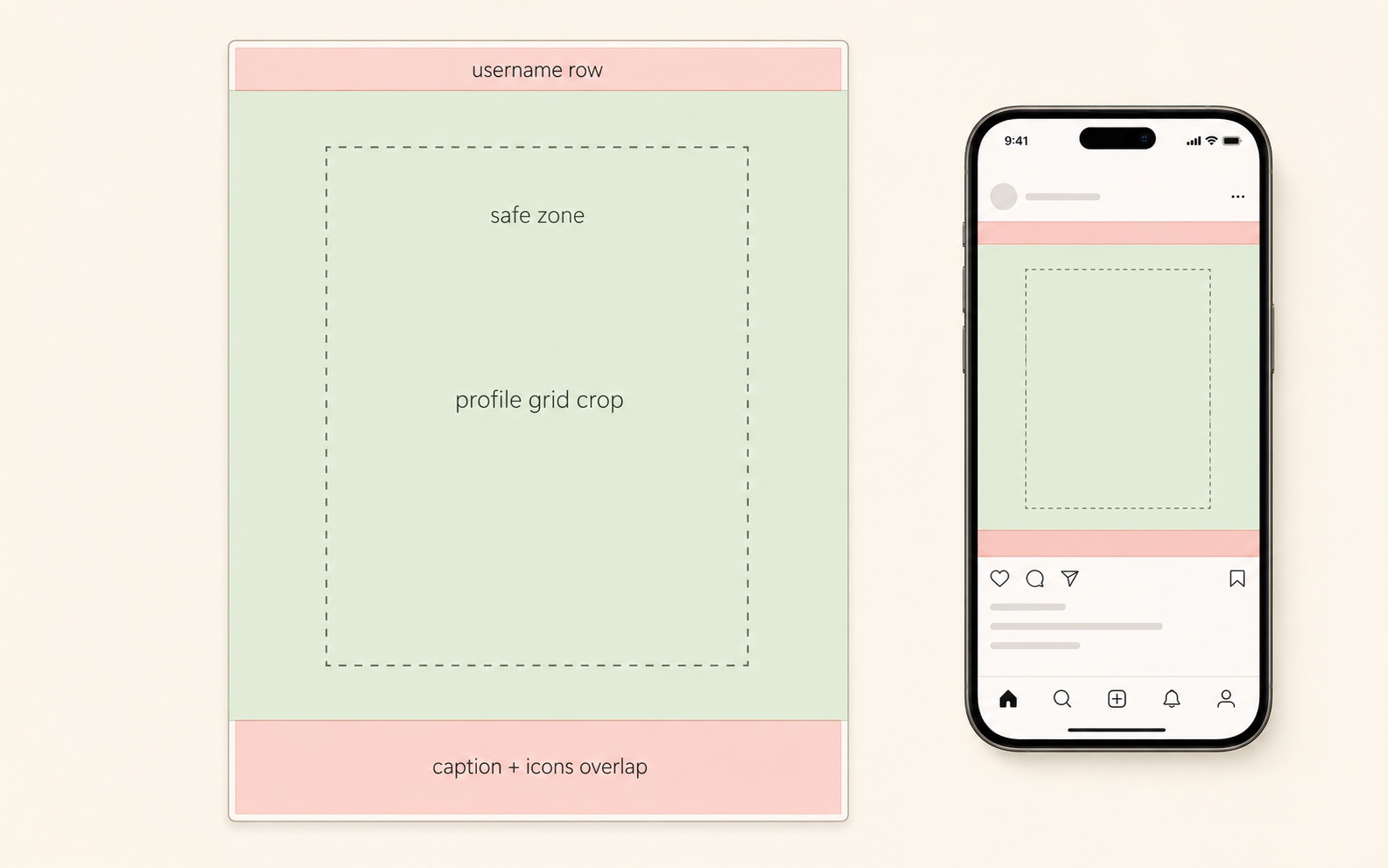
Feed View (4:5 or 3:4 portrait)
- Bottom 10 to 12 percent overlaps with the username, caption preview, like and comment icons, and the page-indicator dots. Anything important here gets covered.
- Top 5 percent sits flush against the username row. Avoid putting type tight to the top edge.
Rule: keep critical content inside a 10 percent safe margin on every edge.
Profile Grid (3:4 crop)
- Instagram displays carousel covers on the profile grid at a 3:4 aspect ratio.
- A 4:5 (1080 by 1350) cover slide gets cropped roughly 6 percent from the top and bottom on the grid.
- A 1:1 (1080 by 1080) cover slide gets cropped about 13 percent from the top and bottom on the grid.
- A 3:4 (1080 by 1440) cover slide is shown uncropped on the grid.
Rule: if your cover carries the hook, design two safe versions: one for the feed (full slide) and a center-safe version for the grid (3:4 crop in the middle).
Explore and Search
- Explore previews crop to a 4:5 ratio in most layouts but can shift to 1:1 in some surfaces.
- Stay within the 10 percent margin and you survive every Explore variation.
Export Settings That Avoid Compression Damage
Instagram compresses every upload. You cannot prevent it, but you can make compression less noticeable.
- Export at 1080 pixels wide. Larger uploads get downscaled before compression, which doubles the quality loss.
- Use sRGB. Adobe RGB and ProPhoto color profiles get clipped on upload and shift colors.
- Save photos as JPG at quality 85 to 95. Higher quality is wasted; lower starts to show banding in solid color blocks.
- Save text-heavy slides as PNG. PNG preserves crisp type edges that JPG smears.
- Avoid double compression. Do not export a JPG, edit it, and re-export as JPG. Always work from the source file.
- Test on a real phone. Desktop preview hides most compression artifacts. View every slide on a mobile device before publishing.
Quick Reference Cheat Sheet
| Question | Answer |
|---|---|
| Best default size | 1080 × 1350 px (4:5 portrait) |
| New 2026 size option | 1080 × 1440 px (3:4 tall) |
| Maximum slides per carousel | 20 |
| Minimum slides | 2 |
| Maximum image file size | 30 MB |
| Maximum video length per slide | 60 seconds |
| Maximum video file size | 4 GB |
| Caption character limit | 2,200 |
| Maximum hashtags | 30 |
| Profile grid crop | 3:4 |
| Required color profile | sRGB |
| Recommended file format (photos) | JPG, quality 85 to 95 |
| Recommended file format (text slides) | PNG |
Common Sizing Mistakes
| Mistake | Fix |
|---|---|
| Mixing 4:5 and 1:1 in the same post | Pick one ratio for the whole carousel. |
| Critical text in the bottom 10 percent | Keep all text inside a 10 percent safe margin. |
| Uploading 2160 by 2700 pixel slides | Export at 1080 wide. Anything larger gets downscaled. |
| Designing covers grid-blind | Center the hook so it survives the 3:4 grid crop. |
| Saving everything as JPG | Use PNG for text-heavy slides to keep type sharp. |
| Using Adobe RGB color profile | Convert to sRGB before export. |
| Treating 3:4 as the new default | 4:5 is still Instagram's recommended preset. |
Instagram Carousel Size FAQ
Is Instagram 4:5 or 3:4 in 2026?
Both are supported, but they serve different purposes. 4:5 (1080 by 1350) is still Instagram's recommended preset and has the longest engagement track record. 3:4 (1080 by 1440) was added in 2026 and gives slightly more vertical space, mostly useful for text-heavy or full-body content.
Is 1080 × 1350 4:5 or 3:4?
1080 by 1350 is 4:5. Divide 1350 by 1080 and you get 1.25; a 4:5 ratio is 1:1.25. The 3:4 carousel option is 1080 by 1440 (1080 × 1.333).
What is the size of an Instagram carousel slide?
The recommended size is 1080 by 1350 pixels (4:5). Other supported sizes are 1080 by 1080 (1:1), 1080 by 1440 (3:4), and 1080 by 566 (1.91:1).
Can Instagram carousels be 4:5?
Yes. 4:5 is Instagram's recommended carousel ratio. The pixel size is 1080 by 1350.
How many photos can be in an Instagram carousel?
Up to 20. The original limit was 10; Instagram raised it to 20 in 2023, and the cap still applies in 2026. You can mix photos and videos in any order.
Why do my Instagram carousel slides look blurry?
Three usual causes: you uploaded a slide narrower than 1080 pixels (Instagram upscaled it), you used Adobe RGB instead of sRGB (colors shifted), or you saved a JPG twice (double compression). Export fresh at 1080 wide, sRGB, JPG quality 90 or PNG.
Does Instagram support landscape carousels?
Yes, at 1.91:1 (1080 by 566 pixels), but the slides appear small in the mobile feed and look lost on the profile grid. Avoid landscape carousels unless the source content is genuinely landscape.
Next Steps
Now that the specs are settled, the natural next reads are:
- The format and strategy hub: Instagram Carousel Posts: The Complete Guide for 2026.
- The platform comparison: LinkedIn Carousel Size Guide 2026.
- The format definition: What Is a Carousel Post?.
If you want carousels that are already sized correctly for Instagram out of the box, Insta Posts generates 1080 by 1350 pixel slides from a single prompt, ready to upload. You can switch to 1080 by 1440 or 1080 by 1080 with one click.
Ready to create carousels with AI?
Turn any idea into a polished LinkedIn or Instagram carousel in under 60 seconds.